
Construction Material Procurement Log Template

A procurement log with one status cell and one date per package hides the wrong order date until a crew is waiting for material. Use one row per material package, keep separate columns for what the project planned, what the supplier confirmed and what actually arrived, and work the order date back from the site need date with lead-time and review inputs obtained for this job.
This guide gives you two blank files and explains how to fill them. The procurement log tracks each package from submittal to acceptance. The PO field sheet lists what to confirm before a purchase order is issued. Both are editable editorial records from an independent publication: adapt them to your project’s procedures. They are not contract forms and contain no lead times, prices or approval rules.
- Download the blank procurement log (CSV) — 41 columns, header row and one empty row.
- Download the blank PO field sheet (CSV) — 28 columns, header row and one empty row.
The log extends the short tracking table in our construction material procurement process guide without changing what its columns mean. The core columns below are the ones most teams keep visible; the download adds the rest.
Scroll horizontally to see all columns.
| Core column | What to enter | Keep it separate from |
|---|---|---|
| Material / package | Package ID and plain description | Supplier’s catalog name |
| Specification / drawing reference | Section, drawing number and current revision | An older revision or a quote description |
| Quantity and unit | Quantity required with its unit | Quantity ordered on the PO line, or received |
| Owner | The named person who updates this row | The company that supplies the material |
| Submittal status | The exact returned disposition and its date | Release authority / decision |
| Site need date | Date from the current schedule, with what it means (delivery, install, use) | Expected delivery date |
| PO number / line | The issued PO and line reference | Quote reference |
| Supplier-confirmed ship date | Date the supplier confirmed, with the confirmation reference | Planned order date |
| Expected delivery date | Current best date for arrival on site | Site need date |
| Actual receipt date | Date material arrived, with the receipt reference | Acceptance / hold status |
| Variance | Difference between expected delivery and site need date | A guess about who caused it |
| Next action | One action, a responsible person and a due date | General notes |
The procurement topic archive collects the related buying guides.
Log, schedule or PO field sheet: which record do you need?
You need all three, but they answer different questions. When they are merged into one sheet, the history of what changed is easy to lose.
Scroll horizontally to see all columns.
| Record | Question it answers | Main inputs | Where it lives in the downloads |
|---|---|---|---|
| Procurement log | Where is each package now, and what happens next? | Submittal status, PO reference, confirmed dates, receipts | Procurement log CSV, one row per package or receipt |
| Procurement schedule | When must each step happen to meet the site need date? | Site need date, lead-time input, review inputs | Planning columns in the log CSV: inputs, resubmittal allowance and each calculated date |
| PO field sheet | What must be settled and written before the order is issued? | Quote, specification revision, quantities, delivery and document requirements | PO field sheet CSV, one row per PO line |
Link the three with the same package ID and PO line. The log should point to the PO and the submittal; it should not copy their full content. A new supplier needs more checks before the first PO than this sheet covers: use the first-order risk checklist for deposit, production and shipment gates.
Takeaway: Keep one package ID across the log, the schedule columns and the PO so every record points to the same thing.
What fields should a construction material procurement log include?
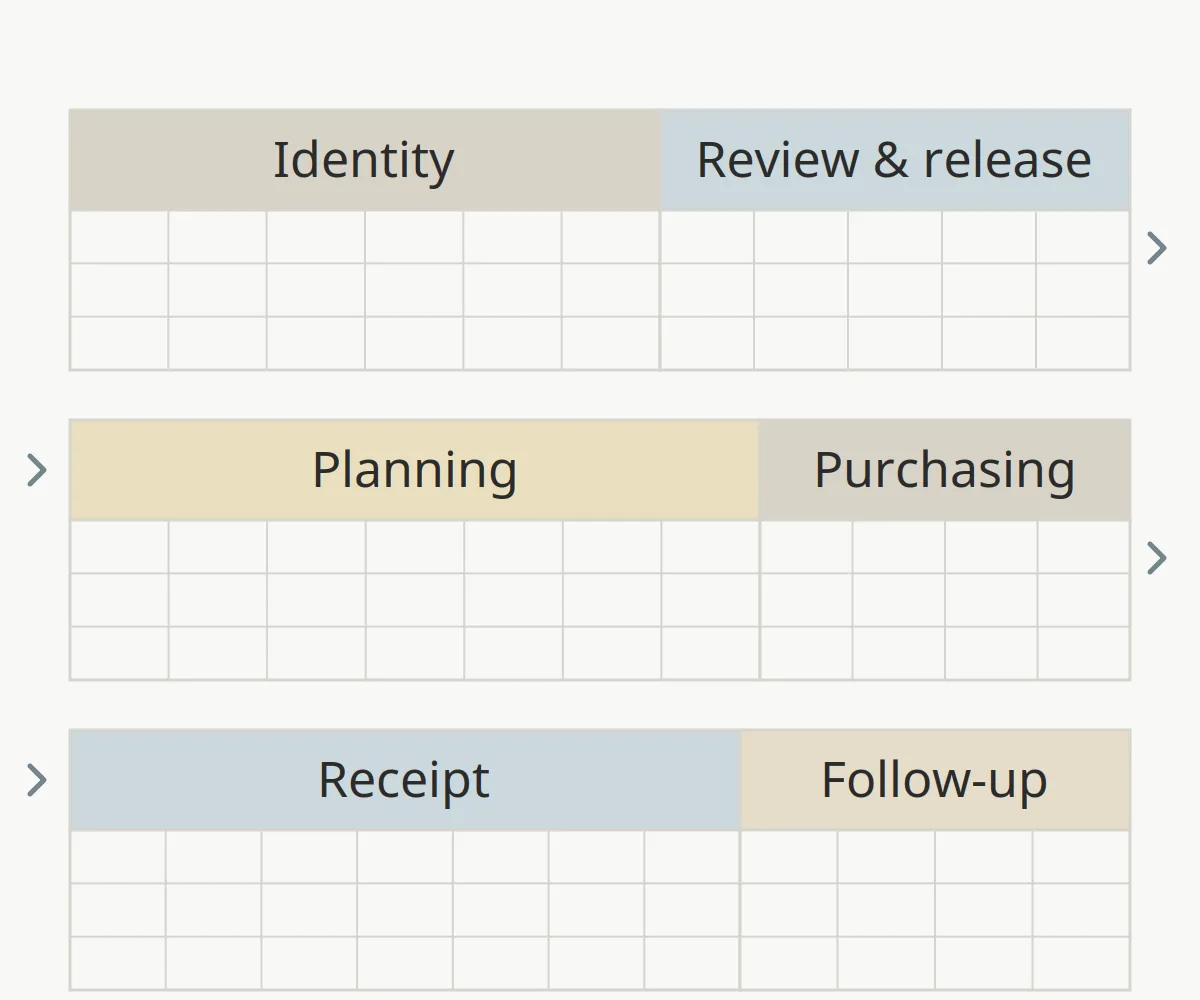
The downloadable log has 41 columns in six groups, in the same left-to-right order as the file. Hide the groups you do not use rather than deleting them, so a later team can see what was never tracked.
Scroll horizontally to see all columns.
| Field group | Columns in the CSV | Why it is separate |
|---|---|---|
| Identity | Package ID, material / package, specification / drawing reference, current revision, quantity required, unit, supplier / contact, Owner | A row is only useful if everyone means the same material and revision |
| Review and release | Submittal reference, submittal status, review response date, open comments / evidence reference, release authority / decision | A returned submittal and permission to fabricate are different decisions |
| Planning | Site need date, schedule activity reference, lead time input, calendar basis, lead time quote / confirmation reference, external review input, internal review input, resubmittal allowance, required return date, internal review complete date, submit-by date, planned order date | Keeps each input next to the date calculated from it |
| Purchasing and expediting | PO number / line, quantity ordered on PO line, actual order date, supplier-confirmed ship date, fabrication / shipping status | Records what was ordered and what the supplier has actually committed to |
| Receipt and closeout | Expected delivery date, actual receipt date, quantity received this receipt, quantity outstanding on PO line after this receipt, receipt / packing list reference, receipt exceptions, acceptance / hold status (this receipt) | Arrival, shortage and acceptance are three different facts |
| Follow-up | Variance, next action, next action due date, last verified date | Turns the row into a task with an owner and a date |
The review columns reuse the terms in our site coordination handoff transmittal: current drawing revision and review status, prerequisite evidence, outstanding comments and release authority. Record the submittal disposition exactly as returned. A status such as “reviewed” does not by itself release fabrication; the release decision belongs in its own column with the name of whoever holds that authority on the project.
When a package is a proposed substitution, carry the evidence reference and report version from the specification comparison guide into the open comments column. A matching catalog number does not show that an alternative meets the specification.
Leave a cell blank, or write “Pending”, when the information has not been obtained. Do not enter zero for an unknown lead time or quantity; zero is a value, and it will make a late package look on time.
Common mistake: copying the site need date into the supplier-confirmed ship date column so the row “looks complete”. The first is what the project needs; the second is what the supplier has committed to, and only a dated confirmation fills it.
Takeaway: Give each fact its own column, and keep blanks blank until a dated source fills them.
How do you build the procurement schedule backward from the site need date?
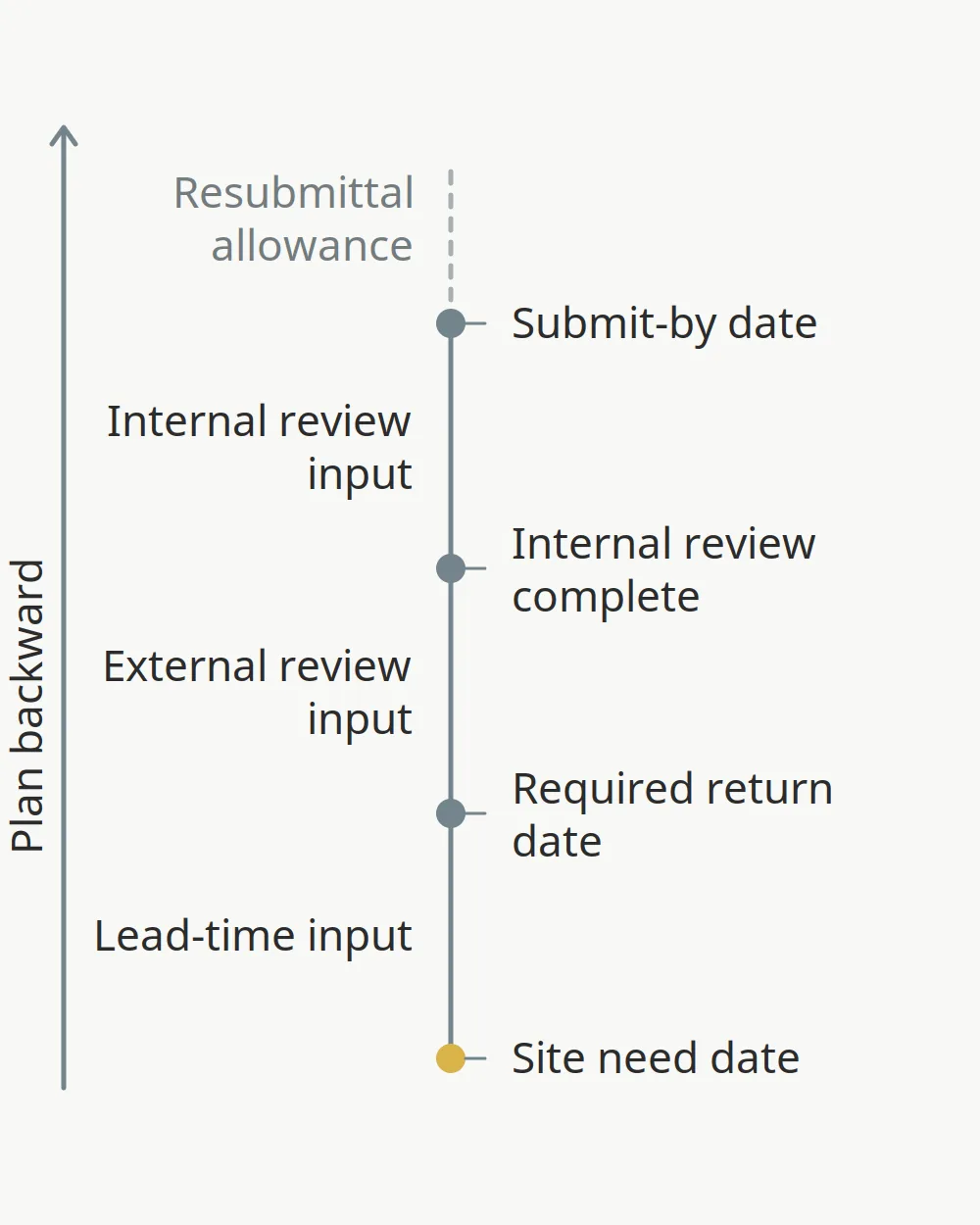
Start from the date the work needs the material and subtract each input you have for this job. Procore’s submittal documentation shows the same back-calculation: a required on-site date, then a lead time covering processing, manufacturing and shipping, then design-team review time, then internal review time, each entered by the user. It also states that these planning dates are for reference only, do not drive workflow due dates and assume no resubmittals (Procore, Best Practices: Submittals).
Scroll horizontally to see all columns.
| Step | Date to calculate | Formula (all inputs from this project) |
|---|---|---|
| 1 | Site need date | From the current schedule activity; record the schedule version |
| 2 | Required return date | Site need date − confirmed lead-time input |
| 3 | Internal review complete | Required return date − external review input |
| 4 | Submit-by date | Internal review complete − internal review input |
| 5 | Planned order date | Required return date, moved earlier if the supplier’s lead time starts at the PO or deposit rather than at release |
The planning columns in the log hold each input and each calculated date in this order, so a reader can see which input produced which date. Fill each input from a source you can name, and check five things before you trust the result:
- What the need date means. Decide whether it is the delivery date, the date the material must be available for installation or the date it is used. If receiving, inspection or staging needs time before installation, record that as its own input instead of hiding it inside the lead time.
- What the lead time covers. Ask the supplier when the clock starts (PO, approved submittal, release, deposit) and whether it includes transit to site. Write the answer and the quote or confirmation reference in the log.
- Calendar basis. Record whether each input is in calendar days or working days. Mixing them shifts every date.
- Resubmittals. If a rejected or revised submittal is a real possibility, add a separate resubmittal allowance as a project decision. Do not quietly enlarge the review input.
- Recalculation. When the schedule activity moves or the supplier changes a date, recalculate and keep the earlier value in the history.
We do not give typical lead times or review periods here. They vary by product, supplier, region and contract, and a borrowed number hides the exact constraint the schedule is meant to show. Discuss a date that no longer works at the next coordination meeting using the OAC meeting action record. Cost reserves for schedule risk are a separate decision; the contingency guide explains where they belong.
The CSV contains no formulas. If you add date formulas in a spreadsheet, test them with your own calendar basis before relying on them.
Takeaway: Every planned date is only as good as the named inputs behind it; record the input and its source next to the date.
Planned, confirmed, received, accepted: how do you keep the statuses apart?
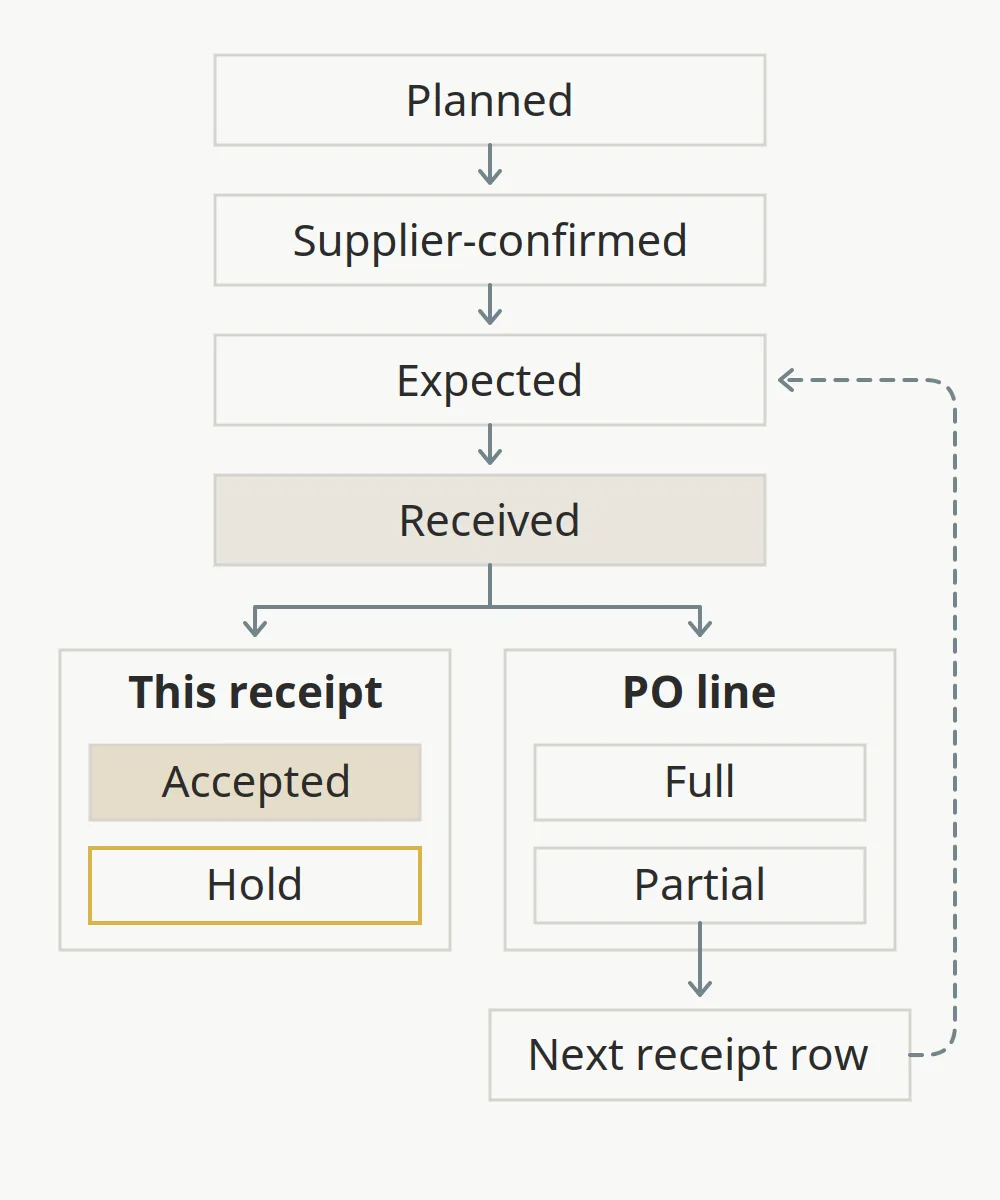
A package passes through several states that are easy to collapse into one word such as “done”. Track each one in its own column.
Scroll horizontally to see all columns.
| State | Evidence that sets it | What it does not mean |
|---|---|---|
| Planned | Back-planned date in the log | Any commitment from the supplier |
| Supplier-confirmed | Dated written confirmation, with reference | That the material has shipped |
| Expected | Current best arrival date after the latest update | That the site need date will be met |
| Received | Receipt or packing list reference and actual receipt date | That the material conforms or is accepted |
| Accepted / hold | The project’s inspection and acceptance record for this receipt | A decision made by the log itself, or that the PO line is complete |
The US federal Order for Supplies or Services, GSA Optional Form 347, shows the same separation on paper: the order schedule has a “quantity ordered” column and a separate “quantity accepted” column, and the back of the form carries a receiving report (with partial or final shipment and date received) and a separate report of rejections with quantity and reason (GSA OF 347). It is a federal example of record structure, not a form private projects have to use.
Acceptance and completeness are separate questions. Each receipt row gets its own acceptance or hold status, whether the delivery was full or partial; a full delivery can still be held, and an accepted partial delivery still leaves the rest owed, to be recorded on the next receipt row.
For partial deliveries, add a row for each receipt whose date or receipt reference differs, and keep the same package ID and PO line on each row. Take the quantity received this receipt from that receipt or packing list. The quantity outstanding is not on the receipt: work it out as the quantity ordered on the PO line minus everything received against that line up to and including this receipt, and note which rows you counted. Quantity ordered comes from the PO, not from the quantity required, which can differ, for example when one package is split across several PO lines. Do not add up the outstanding column across rows; each value is a balance for its PO line at that receipt. The CSV does not calculate either quantity.
Inspection at delivery has its own procedure. Use the construction quality control checklist for what to check at material receipt, and the quality control plan guide to connect the approved submittal to the receiving inspection.
Takeaway: “Delivered” is not “accepted”; a hold or a shortage stays open in the log until the record that closes it exists.
What should a construction material purchase order format contain?
There is no single required format for a private construction PO; the contract and your company’s purchasing procedure set it. A useful PO for material removes ambiguity about what, how much, where, when and against which approved documents. The blank PO field sheet groups 28 fields to confirm before issue.
Scroll horizontally to see all columns.
| Field group | Fields in the PO sheet | What to check before issuing |
|---|---|---|
| Order identity | PO number, PO revision, order date, project / package reference | Revision is current and the package ID matches the log |
| Parties | Buyer, supplier, supplier contact, ship-to address / location, consignee / receiving contact | Receiving contact is someone on site who expects the delivery |
| Line scope | Quote reference / revision, line number, material description / specification, drawing / product revision | Description matches the reviewed submittal, not an older quote |
| Quantity and price | Quantity ordered, unit, unit price input, currency, line amount input | Units match the takeoff; amounts are entered, not assumed |
| Delivery | Freight / tax scope reference, delivery date / window, delivery terms reference | Delivery point, freight payment and risk of loss are stated in words |
| Documents and acceptance | Required document references, inspection / acceptance procedure reference, payment terms reference | Certificates and reports the site needs are named on the order |
| Authority and links | Authorized issuer, supplier acknowledgement reference, related submittal / release reference, notes / unresolved items | Supplier acknowledgement is recorded before the date is treated as confirmed |
GSA’s OF 347 follows a similar pattern: order date and number, issuing office, contractor, ship-to consignee, F.O.B. point, a deliver-by date and an item schedule with quantity, unit, unit price and amount. Treat it as an example of how a buyer’s order separates identity, parties, delivery and line items; it does not make every field mandatory on your project.
Delivery terms need care. The procurement process guide explains why “FOB jobsite” on a domestic order is not an Incoterms rule. Before a first order with a supplier, check them with how to evaluate a building material supplier. When comparing quotes for the same line, put freight, handling and delay on the same basis using the total installed cost guide.
Takeaway: Write the reviewed revision, the delivery point and the required documents on the PO line, and record the supplier’s acknowledgement before using its dates.
How do you handle a changed date, a partial delivery or an open comment?
The log earns its keep when something changes. The examples below use a placeholder, Package A, and “Pending” instead of dates; they are editorial illustrations, not a real project.
Scroll horizontally to see all columns.
| Event | What to change in the log | What to keep |
|---|---|---|
| Supplier moves the ship date | Update supplier-confirmed ship date with the new confirmation reference; recalculate expected delivery date and variance; set a next action | The earlier date and reference in your change history or notes |
| Package A arrives short | Add a receipt row with the actual receipt date, quantity received and receipt reference; enter quantity outstanding; record the shortage in receipt exceptions | The first row and its receipt reference, unchanged |
| Submittal returned with open comments | Enter the exact disposition and response date; put the comment reference in open comments; leave release authority / decision as “Pending” | The planned order date, flagged as at risk until release |
Every one of these ends with a next action, a responsible person and a due date. If the action needs another party, carry it into the site coordination record or the OAC action record rather than keeping it only in the log.
Takeaway: Record each change as a new dated fact with its reference; do not overwrite the history.
Who updates the log, and when?
Name one person per row in the Owner column. That person updates the row when a fact changes: a new submittal response, a PO revision, a supplier confirmation, a receipt or a hold. The project’s agreed review rhythm, such as a regular coordination meeting, is the second trigger; use it to check rows that have not changed.
- Update the last verified date whenever you confirm a row is still correct, even if nothing changed.
- Sort by variance and by next action due date before each review so late items come first.
- Keep the file in one shared location with version history, and record which schedule version the site need dates came from.
- When a package closes, keep the row; mark acceptance / hold status and leave the history intact.
Takeaway: A log is current only if a named person updates it on every change and records when they last checked it.
When this template does not apply
- Owner-furnished materials, where the owner’s procurement and receiving procedures govern.
- Public projects with mandated purchasing forms or procedures; use the agency’s forms.
- Contract terms, warranty, payment or acceptance rights: the blank PO field sheet lists fields to confirm, not legal wording, and does not make an order enforceable.
- Projects where the log lives in project-management software that already enforces these fields; use the field definitions here to check the setup.
Frequently asked questions
What is material procurement?
Material procurement is the work of defining, sourcing, approving, ordering, tracking and receiving the materials a project needs so that the right material reaches the site, in the right condition, when the work needs it. The procurement log is the record that tracks each package through those steps.
What is the best construction material procurement software?
There is no single best tool; choose one that holds the fields your team actually uses. Check that it keeps submittal status separate from release, stores planned, confirmed and actual dates in separate fields, links each row to its PO and receipt, records who changed what and when, and exports to a plain file such as CSV so the record outlives the subscription.
Can I open the blank CSV log in Excel or Google Sheets?
Yes, CSV is a plain text format that spreadsheet programs can open or import. The files contain only a header row and one empty row: no formulas, drop-down lists, protected cells or multiple tabs. Check how your program interprets dates in your region before entering them, and save your working copy in your program’s own format if you add formulas.
Is the template available as a PDF?
No. The downloads are CSV only, because a log needs to be edited and sorted. If you need a printout for a meeting, print or export the current view from your spreadsheet program.
Can I use the log fields in a Word document?
You can copy the column names into a Word table, but a word processor is poor at sorting by date or variance. For a short list of packages a table works; for anything you update weekly, keep the spreadsheet as the record and paste a snapshot into reports.
Is the procurement log template free to download?
Yes. Both CSV files download directly from this page without a sign-up form. They are blank editorial templates from an independent publication; adapt the columns to your project’s procedures.
How often should a procurement log be updated?
Update a row whenever one of its facts changes, and review all open rows at the project’s agreed coordination interval. Record the last verified date on each row so readers can tell a current entry from one nobody has checked recently.
Sources and method
Muros Construction prepared this guide with AI assistance as an independent editorial resource. The backward-planning steps follow the submittal schedule fields documented in Procore’s Best Practices: Submittals (accessed October 11, 2026); we use the method, not its example durations. The separation of ordered, received, accepted and rejected quantities follows the blank GSA Optional Form 347, Order for Supplies or Services (rev. 2/2012, accessed October 11, 2026), used as an example of record structure only. Column names are aligned with our existing procurement, coordination and specification guides.
The field groups, examples and blank files are our editorial design, not an industry standard or an official form. This guide is general information, not legal or contractual advice.
Related articles
How to Choose Construction Material Procurement Software: A Demo Worksheet
Evaluate construction material procurement software with a blank five-test vendor demo worksheet covering submittal revisions, PO release, split deliveries, damaged receipts and CSV export.
Read article: How to Choose Construction Material Procurement Software: A Demo Worksheet
AIA Contract Documents: A Procurement Form Guide
Match A101, A102, A104, A133, A141, A201, and A401 to the price clause and the delivery route before the wrong general conditions are incorporated.
Read article: AIA Contract Documents: A Procurement Form Guide
Construction Manager at Risk: When the Price Is Set
A construction manager at risk advises during design, then builds under a price ceiling. When that price is set, what it includes, and who awards the trades.
Read article: Construction Manager at Risk: When the Price Is Set